
Localizing software is a great way for rapidly multiplying your income. We’ll go over the different activities required to localize software and explain how they can be done with ICanLocalize.
1. Localize the software itself
The key to software localization is separating code from texts. This means that the application’s texts are held separate from the program code. This separation makes software localization possible and even easy.
Describing the software, the target audience and the writing style
Don’t assume that translators think like you do. Explain to them what the application does, who it’s intended for and what writing style works best.
This way, the translators would be able to adapt the application’s texts to fit the new language and read natural (and not as translation).
Explaining what texts mean
Once the software has a resource file, holding all texts for translation, documentation is vital to help the translators understand what they’re translating.
For example, how would you translate this text?
%s %d of %d
When you tell the translator that it means, it’s not so difficult anymore:
Page 4 of 12
Go through all the application’s texts, see which ones are not clear by themselves (without any context) and add comments to them.
Software localization using ICanLocalize
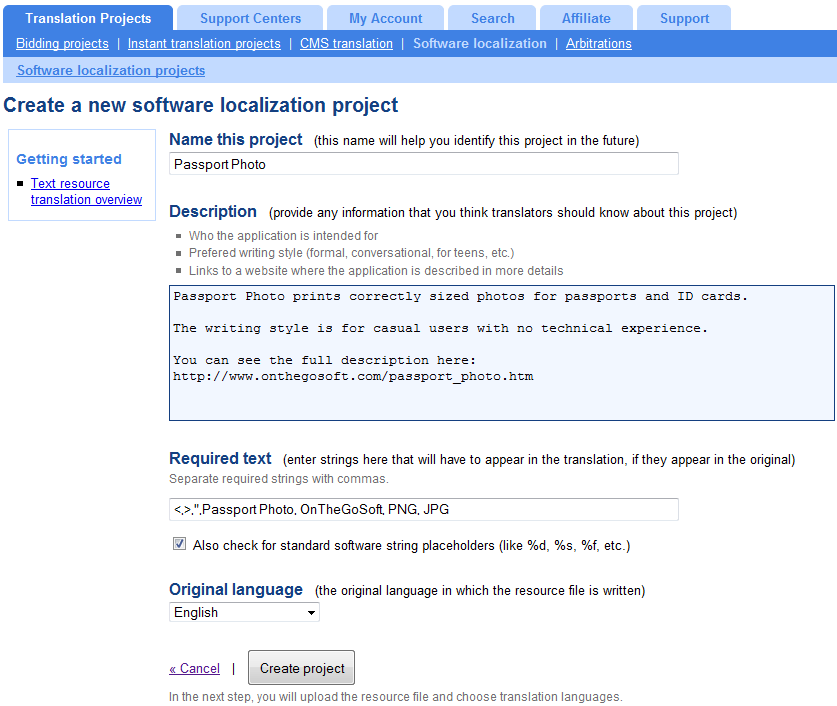 In your ICanLocalize account, click on Software Localization and start a new project.
Use the Project description box to describe the application.
You can enter phrases that shouldn’t be translated, such as the program’s name, your company and any other phrases that need to be left untranslated.
Next, upload the application’s resource file. You can choose from a number of resource file formats to match yours. If texts include comments, these comments will be added for the translators. Otherwise, you can later go through the list of texts and manually add comments.
2. Multilingual checkout
Most major payment processors feature multilingual-ready checkout. When you send clients to pay for your program, make sure to display the checkout page in the right language. Displaying the checkout pages in a default language and allowing users to change it is a sure way for losing sales.
If you’re sending clients to check-out from your website, make sure to include the language in the checkout link. If clients are purchasing from within your application, the program needs to detect the user’s language and create the checkout link with the correct language argument.
3. Translate purchase fulfillment emails
When clients purchase your application, they need to receive an email with a purchase confirmation and instructions for downloading or activating the program they purchased.
This email must be sent in the client’s language, so you need to record the language in which the client is using the program.
Translating fulfillment emails via ICanLocalize
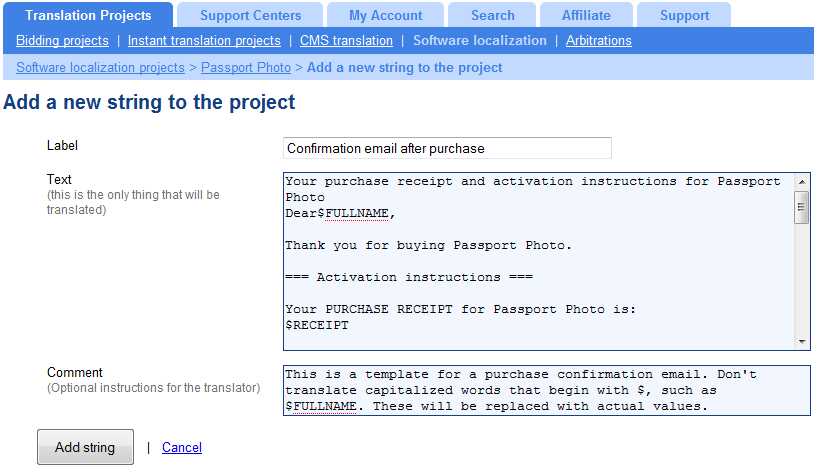 Go to the Software Localization project you’ve created for the application texts. At the end of the screen you’ll see a link to manually add strings. Click on it and you’ll be able to add texts to the project without going through the resource file.
We’ll give a name to the new string (text), paste the text for translation in the Text box and add a comment to the translator, explaining how to translate this text.
The email will be translated together with the software texts, keeping translation clear and consistent.
4. Translate your website
Just like the software, different websites are built using methods. Some folks prefer to code using plain HTML, others use PHP or ASP and others build their sites using content management systems (CMS).
No matter how your site is built, some principles are always true.
To successfully run a multilingual website, you need to:
- Be able to create translations and maintain them when the site contents update.
- Automate the site structure so that translators don’t need to edit links and navigation.
- Let users choose their language easily.
Website translation by ICanLocalize
ICanLocalize offers several ways for translating websites, depending on how you’ve built it.
- If your site is built using static HTML files, we’ll process and scan your HTML files, create translations and add language links to your original files.
- Sites built using PHP / ASP can be translated like software applications using .po files or other lists of texts.
- If you’re using WordPress (leading content management systems), we’ve got a solution that integrates professional translation right into the CMS.
We would like to make our site multilingual. How much does this software cost?
Is it easy to apply? Any information would be appreciated.
Kind Regards
Donna
The software itself is free and you would only be paying for the translation itself. Contact us through the contact form and we’ll help you get started.
Hi Amir,
I hope every think is ok with you.
I’ll be glad if you could let someone to have a look at our site, as its new we are still adding new text and graphics to it….but i mention the name of (i can localize) to other managers with me in the company, but honestly we did not have enough time to find out all the details about it….so we are more concern at the moment about the overall cost of a site as ours, and i can assure to you that if we think that your service will help us now and the long run…i have no objection to use it..Even recommend it to our clients.
Finally please Mr Amir, can you or any one from your office..Gives us rough idea on how much will cost us, to translate our site: http://www.unirecovery.com/en to Italian, French, German, Spanish and Arabic. But at the moment the most urgent is Italian.